
















How to detect a fake SSD or flash drive before you get burned

It’s not just on dubious trading platforms such as Temu. Even Amazon can be infiltrated by dubious dealers who advertise SSDs with large storage capacities as supposed bargains.
These cheat packs do not come from Amazon’s own warehouse, but from external service providers who offer their counterfeit products via the favorable “Warehouse” deals (i.e. as returned goods).
The quality of the counterfeit drives varies — from cheap fakes to professional counterfeits that cannot be recognized as such from the outside at first glance.
In addition to genuine flash memory media that have simply been given a different sticker with product specifications, there are also completely counterfeit circuit boards with a fraudulent controller.
This scam can be found on external drives with a USB connection. The controller tricks the operating system into believing a false drive size, simulates write operations, but only actually stores a fraction of the data.
Foundry
F3: Check for flash drives
With Linux tools, counterfeit or simply defective flash drives can at least be clearly and reliably recognized. The F3 (Fight Flash Fraud) tool can scrutinize flash drives of all kinds and also detects subtle errors caused by normal ageing processes.
It is not fooled by manipulated controller chips, but empirically determines the real capacity of a drive as well as its read and write speeds.
F3 can also check the integrity of written data by writing and reading the entire space to identify old, unreliable flash memory.
F3 is a collection of command-line tools that is present in the repositories of most distributions. In Debian, Ubuntu, and others, for example, it can be installed in the terminal with the command
sudo apt install f3For flash drives such as SD cards, USB sticks, external drives with flash media, but also for internal NVMe SSDs, the program
f3probeis the most suitable tool in this collection of tools. It immediately determines the real capacity of a drive and is not fooled by controller chips.
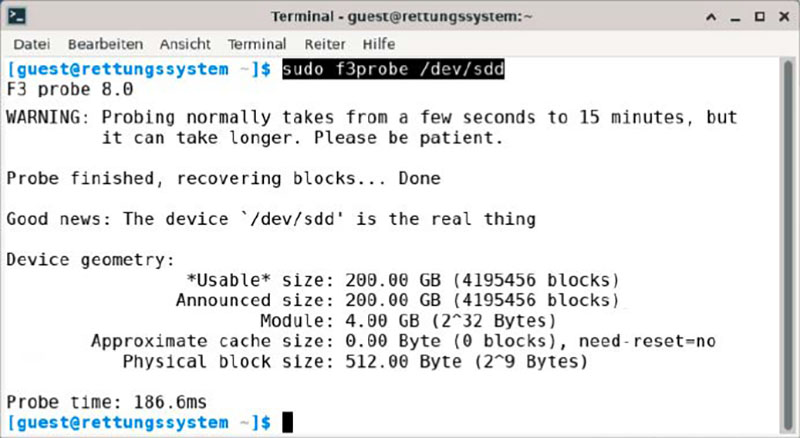
Check with f3probe: The test program determines the total capacity reported by the controller and compares written data in high memory areas to see whether they are actually readable.
Foundry
An initial test is also non-destructive — i.e. it keeps the contents of a drive intact.
Like the other F3 tools, f3probe requires root authorization or a prefixed sudo, as well as the device ID of the drive, with the command
lsblk -dThe command then starts (example)
sudo f3probe /dev/sddthe non-destructive drive test. The device must not be mounted for this.
If everything is okay with a drive, the tool returns the below message after the check, which compares the actual size with the capacity reported by the controller by means of write and read operations:
Good news. The device /dev/sdd is the real thing.Check with data loss: If the data on the drive is irrelevant, the “–destructive” parameter performs a faster test run. This also requires less memory, but overwrites the entire contents of the drive.
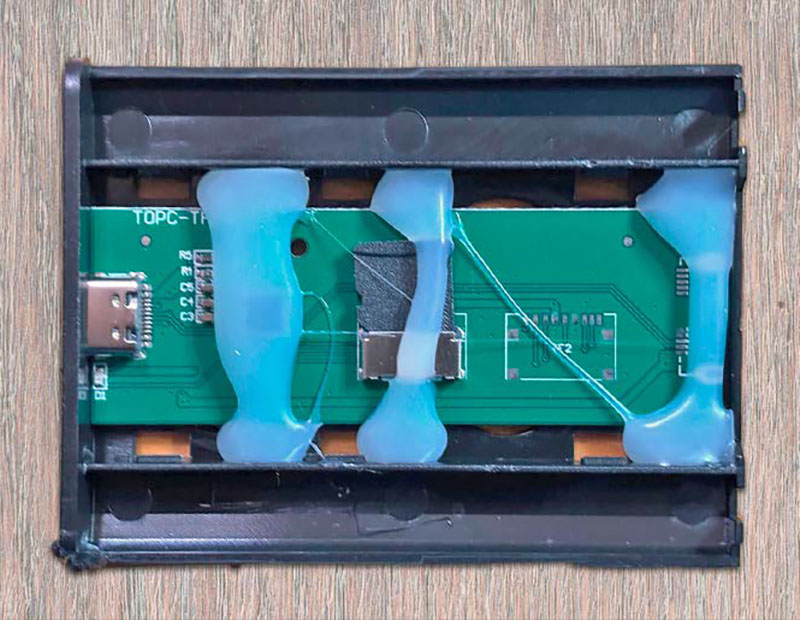
The rudely opened housing of a fake external “SSD”: The circuit board contains a manipulated controller chip and only a small SD card!
Foundry
Also for HDDs: Thorough test
While f3probe compares the information from the controller with the memory addresses actually available on the data carrier, the F3 tools
f3write and
f3read take a more universal approach.
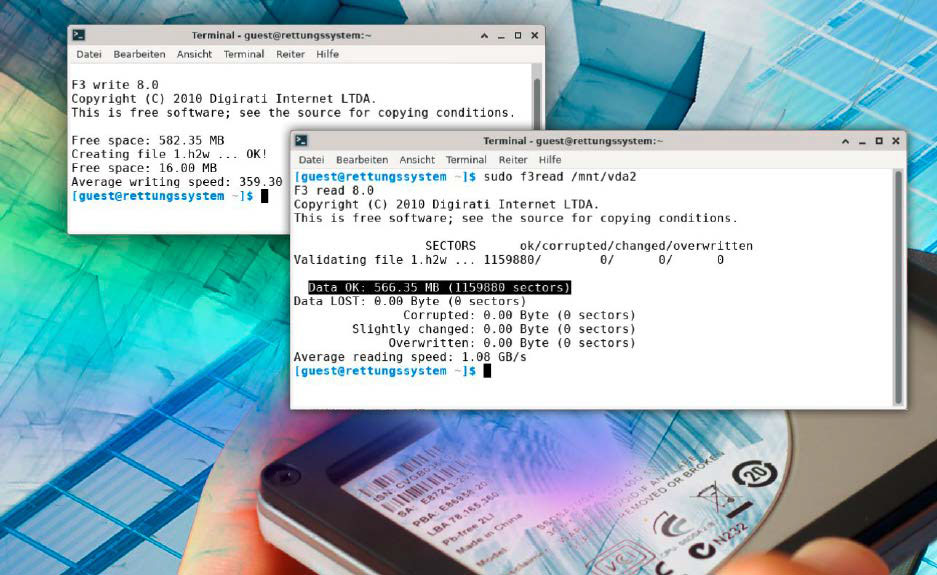
f3write writes files with checksums to a mounted medium until it is completely written, and f3read then verifies this data.
Because these tools work at file system level, regardless of the type of disc being tested, they require partitions that are already mounted and writable. For example, if a drive to be tested is mounted under “/media/user/5EBD- 5C80/”, then
f3write /media/user/5EBD-5C80/executes the write process and
f3read /media/user/5EBD-5C80/verifies the checksums of the written files. In general, this check only uses the free, remaining space on a drive and is therefore not destructive.
NAS hard drives: The recording technology is crucial
The Network Attached Storage (NAS) device class should be permanently available in the network. The mechanical hard drives, which are still the most cost-effective solution for large NAS systems, must therefore be able to withstand continuous operation.
The specifications of conventional SATA hard drives for desktop PCs do not provide for such continuous operation. Hard drive manufacturers therefore offer drives for these application scenarios with the label “NAS” and a surcharge. However, as many users have realized, even the addition of “NAS” is no guarantee of problem-free operation in the NAS.
Only hard disks that do not use modern SMR (Shingled Magnetic Recording) are generally suitable for a RAID network of any kind and for the ZFS file system. With SMR, the internal hard disk controller uses the disks very sparingly: Read-write heads are aligned so that the tracks on a platter overlap in order to maximize storage density.
However, this approach requires several passes before a data record is reliably written and read.
For RAID, which performs a checksum comparison of written data blocks, this recording technique is unsuitable and leads to errors and long waiting times. The Linux kernel developers have documented the problems observed to date at raid.wiki.kernel.org/index.php/Timeout_Mismatch.
According to this, only the conventional recording technology CMR (Conventional Magnetic Recording) with linear tracks is suitable for hard disks in a RAID network.
In recent years, the hard drive manufacturers Western Digital, Seagate, and Toshiba caused a major scandal when hard drives with Shingled Magnetic Recording (SMR) were marketed as NAS hard drives without sufficient labelling.
Unfortunately, a hard drive does not even reveal via SMART analysis whether SMR or CMR is used. At m6u.de/cmr, a NAS service provider collects a list of suitable CMR hard drives based on user information.
Related content
What's Your Reaction?
 Like
0
Like
0
 Dislike
0
Dislike
0
 Love
0
Love
0
 Funny
0
Funny
0
 Angry
0
Angry
0
 Sad
0
Sad
0
 Wow
0
Wow
0