















HP ZBook 8 G1i review: A blazing-fast professional workstation

At a glance
Expert's Rating
Pros
- Serious performance
- Good battery life
- Excellent webcam and mic
- Long warranty
Cons
- Expensive
- 4GB of VRAM puts many local AI models out of reach
- NPU too slow for Copilot+ PC features
Our Verdict
HP’s ZBook 8 G1i is a capable professional workstation with fast performance, good thermals, and an unusually long warranty. But this machine can’t run many AI workflows.
Price When Reviewed
This value will show the geolocated pricing text for product undefined
Best Pricing Today
Best Prices Today: HP ZBook 8 G1i

The HP ZBook 8 G1i is a high-end workstation laptop designed for professional workloads: CAD, 3D modeling, and video editing. It’s priced to match, too. At an eye-watering price of $5,755, this machine seems priced with enough margin to allow big discounts to businesses procuring a fleet for their employees. As I wrapped up this review, HP was offering it at 61 percent off — a price of $2,199.
With a three-year warranty, a bundled Windows 11 Professional license, a fast Intel Core Ultra 7 265H CPU, workstation-class Nvidia graphics, and plenty of RAM and storage, that sale price seems fair for a professional tool like this one. But HP’s promises of “pro-level graphics designed for advanced AI workflows” fall a little flat here.
While this machine has Nvidia graphics that can run local AI features in professional apps, this isn’t the ideal AI workstation PC. Both the GPU and NPU hold it back in AI workloads.
HP ZBook 8 G1i: Specs
The HP ZBook 8 G1i is available in a variety of configurations, both in 14-Inch and 16-inch models. The 16-inch review model HP let us borrow had an Intel Core Ultra 7 265H CPU, 32GB of DDR5 RAM, and a dual-GPU setup with a workstation-class discrete Nvidia RTX 500 Ada GPU and integrated Intel Arc Pro 140T graphics.
The 16-core Intel Core Ultra 7 265H CPU is based on Intel’s Arrow Lake architecture with a max speed of 5.3 GHz, and it delivered CPU and overall system performance that wowed in our benchmark suite.
The RTX 500 Ada GPU here is an entry-level GPU designed for workstation PCs, including CAD software and lightweight AI tasks. Professionals get certified drivers for use with software like AutoCAD, with a promise of greater stability. This machine is not intended for gaming, and the RTX 500 Ada GPU here only has 4 GB of VRAM. So, while HP talks up this machine as an AI workhorse, the lack of VRAM means it isn’t ideal for heavy local AI tasks that need a lot of VRAM, including running larger local models and fine-tuning them.
Quite frankly, the AI story is the weakest part of this machine. With a slow Intel NPU that doesn’t meet the minimum requirements for Microsoft’s Copilot+ PC features and an Nvidia GPU with only 4 GB of VRAM, people looking for an “AI workstation” would do well to look elsewhere. For running local LLMs, a consumer GPU with 12GB of VRAM or more would be ideal. If you download LM Studio, you’ll discover that only the smallest models will run on a GPU like this one.
You’re getting a professional GPU intended for CAD applications that can do some lightweight work with AI-accelerated features in professional apps — as long as they don’t need much video RAM.
- Model number: HP ZBook 8 G1i C01CTUA#ABA / BQ2Z7AA#ABA
- CPU: Intel Core Ultra 7 265H
- Memory: 32GB DDR5-5600 RAM
- Graphics/GPU: Nvidia RTX 500 Ada and Intel Arc Pro 140T
- NPU: Intel AI Boost (13 TOPS)
- Display: 16-inch 1920×1200 IPS display
- Storage: 1TB PCIe Gen4 SSD
- Webcam: 5 MP webcam
- Connectivity: 3x USB Type-C (2x Thunderbolt 4, 1x USB 20Gbps), 1x USB Type-A (5Gbps), 1x HDMI 2.1, 1x combo audio jack, 1x RJ-45 Ethernet, 1x security lock slot
- Networking: Wi-Fi 7, Bluetooth 5.4
- Biometrics: Fingerprint reader and IR camera for facial recognition
- Battery capacity: 77 Watt-hours
- Dimensions: 14.13 x 9.84 x 0.76 inches
- Weight: 3.87 pounds
- MSRP: $5,755 as tested ($2,199 on sale)
If you’re looking for a fast professional workstation, the HP ZBook 8 G1i fits the bill. Just don’t pay $5,755 for it.
HP ZBook 8 G1i: Design and build quality

Foundry / Chris Hoffman
The 16-inch HP ZBook 8 G1i has a metal chassis. Weighing just under four pounds, it’s a reasonable weight for a laptop of this size and capability. It’s not the thinnest machine, but the cooling works well. The CPU here posted high marks in our benchmarks. The thermals are excellent: In a long-running CPU-heavy task like the Cinebench benchmark we perform, the fan whirs away, keeping the CPU running cool. It’s not unusually loud even at high performance levels.
For professionals looking for high performance on CPU-heavy workloads, this machine’s CPU performance will outmatch many high-performance “gaming PCs” that spend their performance budget on a faster GPU and opt for a slower CPU.
The design is standard for a laptop: A blue or gray-tinged silver color that HP calls “Meteor Silver” combined with a black bezel around the display. The hinge feels solid, and the machine is easy to open with one hand. The metal construction feels premium.
HP ZBook 8 G1i: Keyboard and trackpad

Foundry / Chris Hoffman
The 16-inch HP ZBook 8 G1i has a large keyboard that feels responsive, with a number pad and keys that are reasonably snappy. The trackpad is large, smooth, and clicks down with a pleasantly rubbery, bouncy feel.
Both the keyboard and the trackpad here are quiet, which would make them a good fit for an office environment or coffee shop. (Many consumer laptops have surprisingly loud keyboards and trackpads, and they wouldn’t be ideal to type on in an office or in a meeting room with your boss.)
HP ZBook 8 G1i: Display and speakers
Foundry / Chris Hoffman
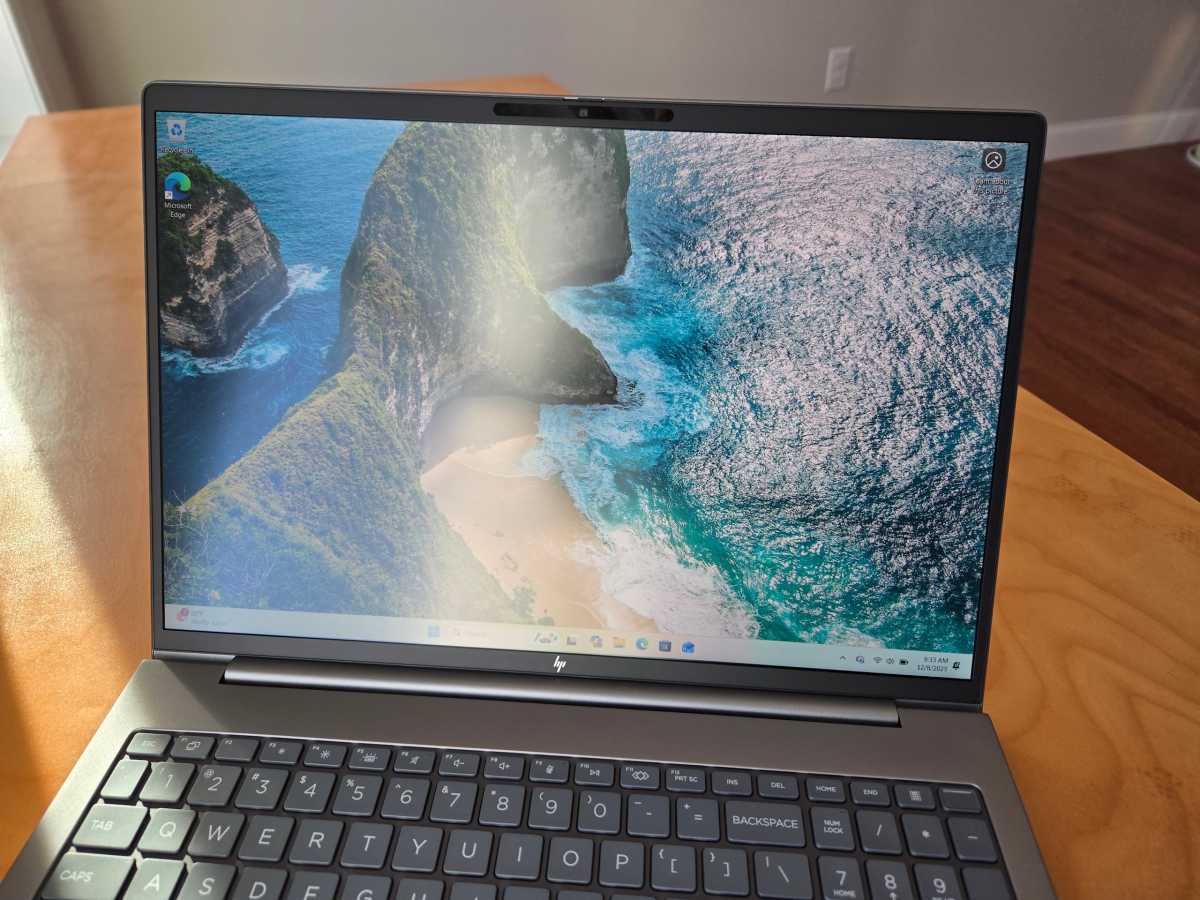
The HP ZBook 8 G1i has a display designed for a business laptop. The 16-inch 1920×1200 IPS display here looks good, but the 60Hz refresh rate is standard and doesn’t go above and beyond on the pixel density. With up to 400 nits of brightness and an anti-glare coating, it stays nicely readable in challenging lighting environments with direct sun or overhead fluorescent lighting.
The display is designed for long battery life and readability, not high-end gaming and multimedia tasks. HP offers other models with higher-end displays — for example, you can get a 3840×2400 IPS display with a 120Hz refresh rate and 500 nits of brightness on some models. But that will negatively impact battery life. The lower-end display delivers better battery life.
The HP ZBook 8 G1i’s speakers get surprisingly loud for a laptop, if you want them to be. Unfortunately, there’s not much bass. At high volume levels, the highs in songs like Steely Dan’s Aja can become somewhat shrill and fatiguing. This machine’s speakers are likely optimized more for speech and meetings. Set at 50 percent volume, this laptop was about as loud as many other laptops I’ve used.
HP ZBook 8 G1i: Webcam, microphone, biometrics
The HP ZBook 8 G1i’s 5 MP webcam is unusually good, which is what I’d hope to see in a high-end laptop designed for work. Even on a cloudy winter day in New England, the ambient light coming through the window in my office resulted in a clear, crisp image without much visual noise.
The microphone setup here is also impressive: It picked up my voice with a good amount of vocal depth and canceled out background noise. Cheaper laptop mics often sound “tinny.” This machine is an excellent choice if you take part in a lot of online meetings.
HP included multiple biometrics options on our review model: Both an IR camera for facial recognition and a fingerprint reader at the top-right corner of the keyboard tray.
HP ZBook 8 G1i: Connectivity
Foundry / Chris Hoffman
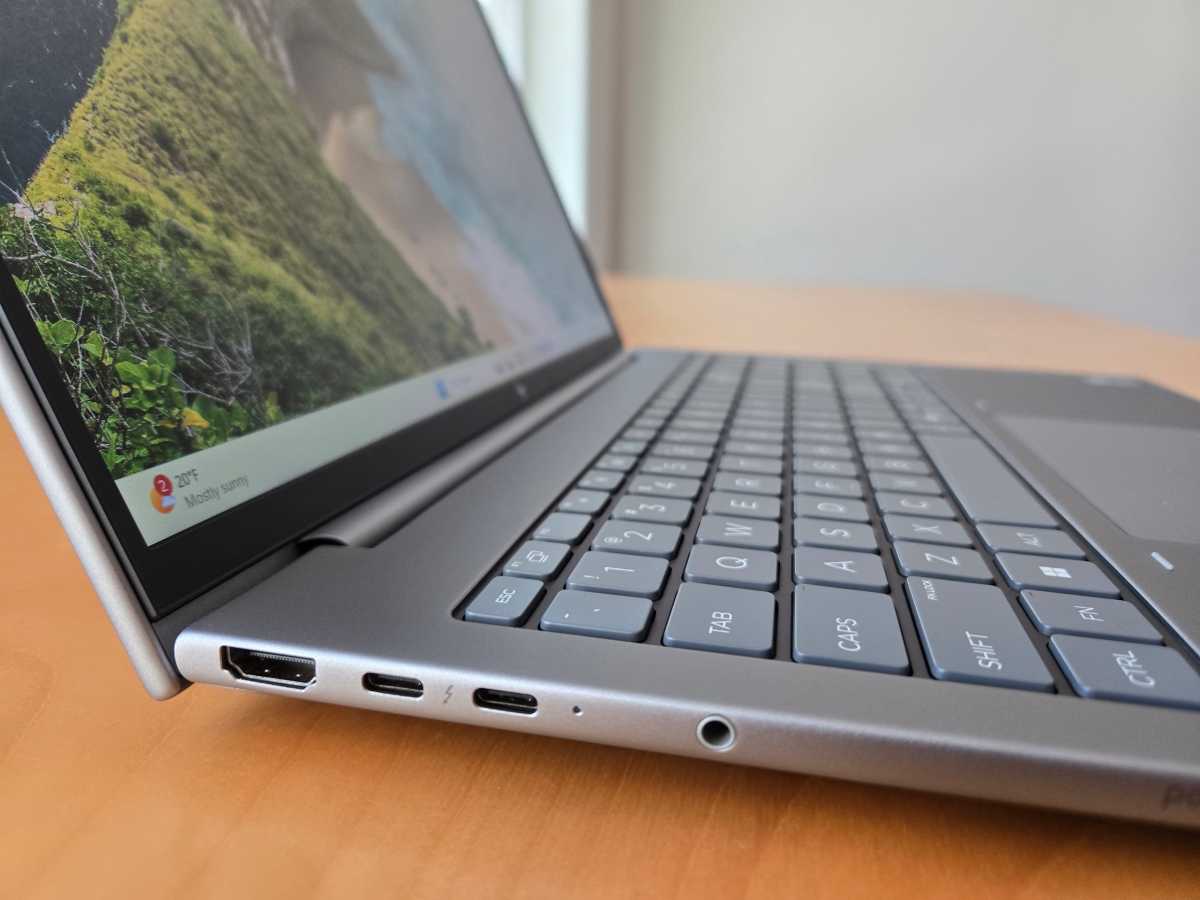
The HP ZBook 8 G1i has a good selection of ports. On the left side, it has two Thunderbolt 4 (USB Type-C) ports, an HDMI 2.1 port, and a combo audio jack.
On the right side, it has a third USB Type-C port (20Gbps), a USB Type-A port (5Gbps), a RJ-45 Ethernet port, and a security lock slot. It’s great having USB Type-C ports on both sides. As the laptop charges via USB Type-C, this means you can plug the charging cable into either side. That’s always great to see on a laptop.
It’s a capable loadout of ports, especially with Ethernet — a critical business port. And our review model supported both Wi-Fi 7 and Bluetooth 5.4, although the hardware on different ZBook models varies.
HP also offers an optional external nano SIM slot on some models, so you can connect this laptop to cellular data.
HP ZBook 8 G1i: Performance
The HP ZBook 8 G1i flew in day-to-day desktop tasks. The Intel Core Ultra 7 265H CPU here is fast, and this machine’s thermals are set up to let it run hard without slowing down under load. With 32GB of RAM and a fast 1TB SSD, the machine is set up for high performance in professional apps.
As always, we ran the HP ZBook 8 G1i through our standard benchmarks.
Foundry / Chris Hoffman
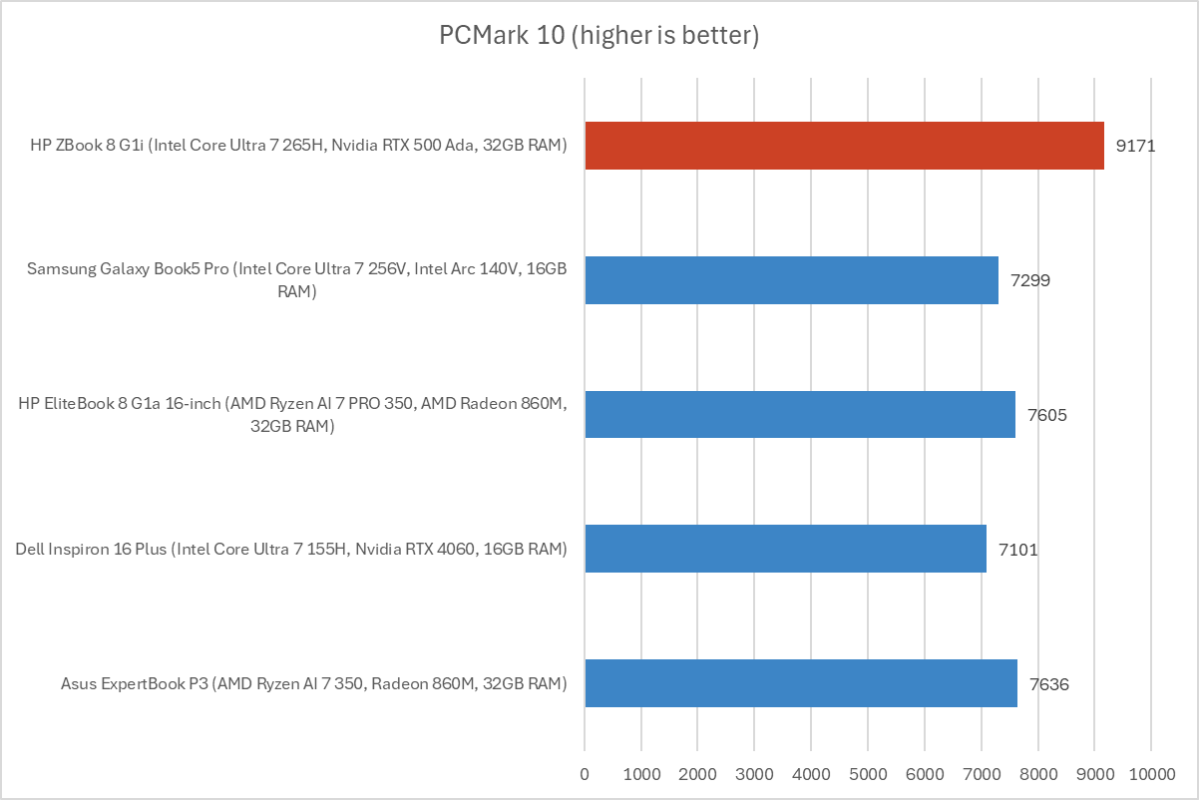
First, we run PCMark 10 to get an idea of overall system performance. The HP ZBook 8 G1i delivered an overall PCMark 10 score of 9,171. This is a CPU-focused benchmark where the GPU is less important, but the SSD and overall system performance come into play.
This is higher overall system performance than many gaming laptops I’ve reviewed, and the ZBook can deliver it over extended periods of time with a fan that isn’t all that loud. This alone will make this machine a great option for many professionals.
Foundry / Chris Hoffman
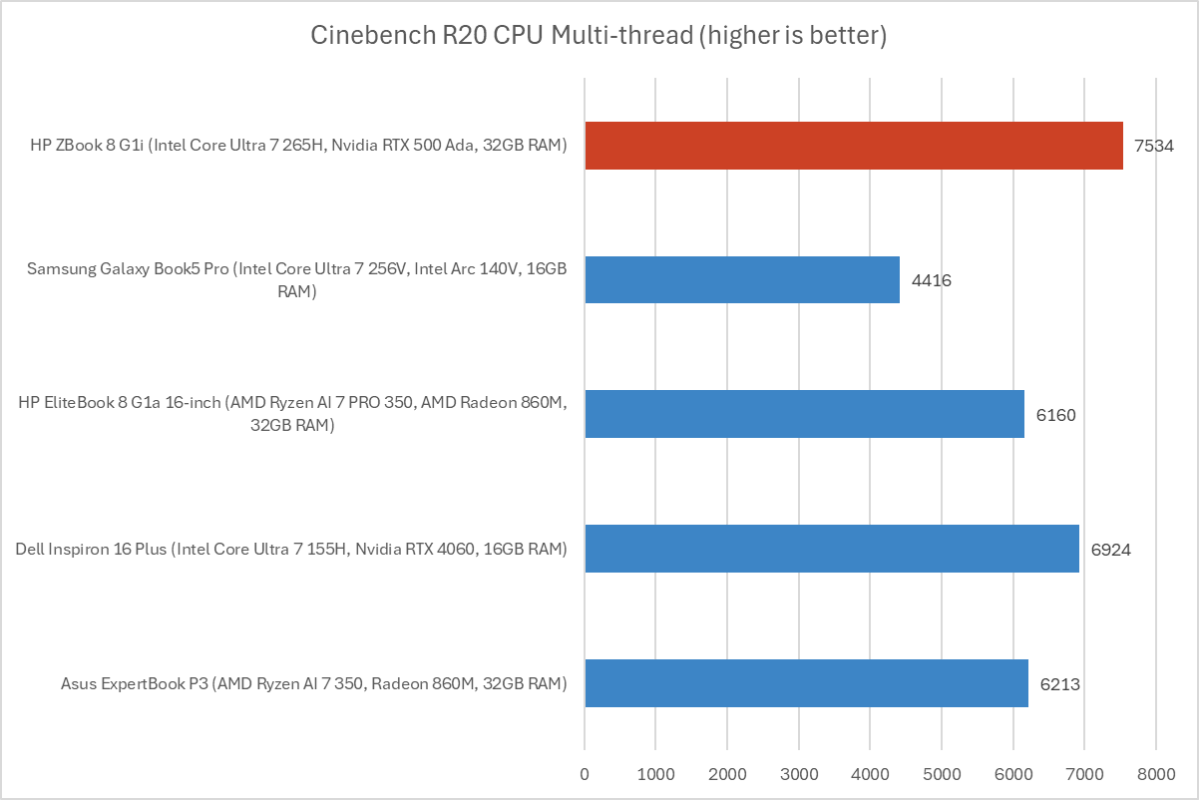
Next, we run Cinebench R20. This is a heavily multithreaded benchmark that focuses on overall CPU performance. It’s a quick benchmark, so cooling under extended workloads isn’t a factor. But, since it’s heavily multithreaded, CPUs with more cores have a huge advantage.
With a multithreaded score of 7,534, the HP ZBook 8 G1i again notched serious multithreaded CPU performance that outmatched many other laptops.
Foundry / Chris Hoffman
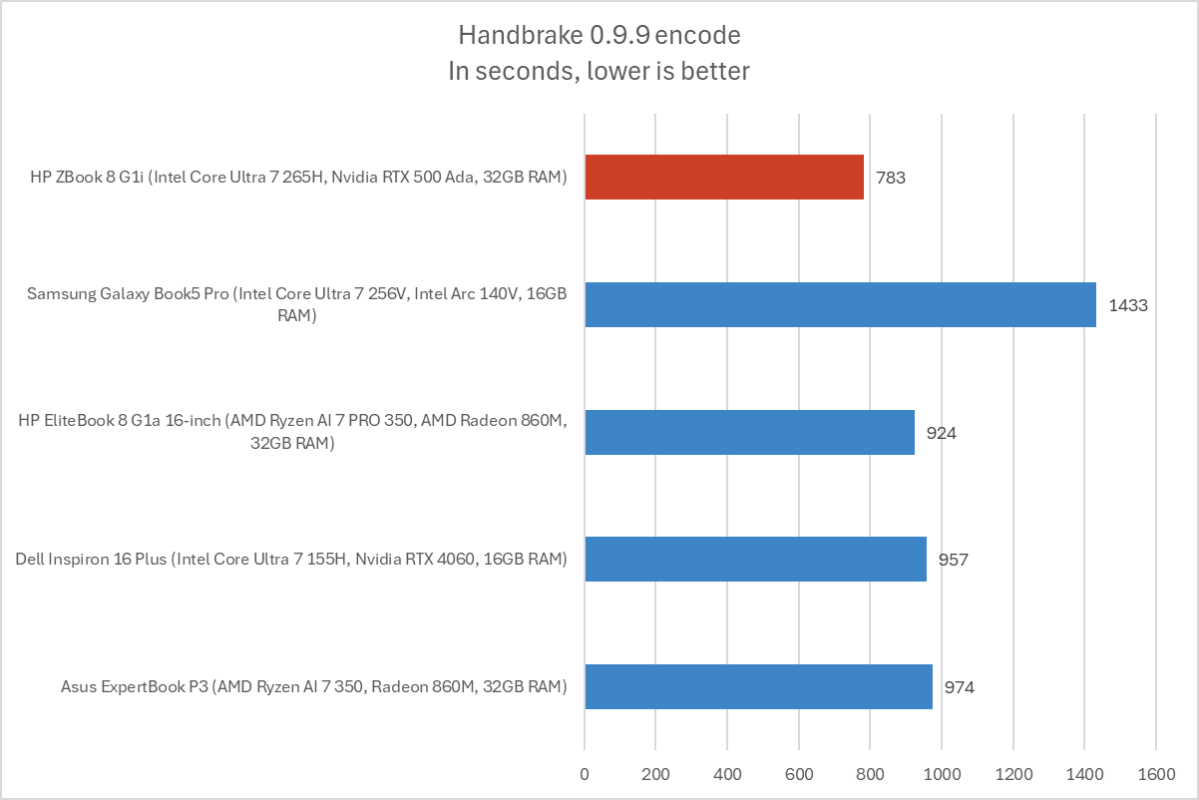
We also run an encode with Handbrake. This is another heavily multithreaded benchmark, but it runs over an extended period. This forces the laptop’s cooling to kick in, and many laptops will throttle and slow down under load.
The HP ZBook 8 G1i completed the encode process in an average of 783 seconds — that’s just over 13 minutes. It’s an unusually good score and shows the machine’s thermals are well-designed. It can deliver serious performance for extended periods of time under load.

Foundry / Chris Hoffman
Next, we run a graphical benchmark. This isn’t a gaming laptop, and the GPU will generally be used for GPU-based professional apps and perhaps accelerating some local AI tasks. We run 3Dmark Time Spy, a graphical benchmark that focuses on GPU performance.
With a 3DMark Time Spy score of 6,053, we see where the raw GPU performance falls: More comparable to an older RTX 3050 Ti GPU than a newer 50-series GPU. But you don’t buy a workstation-class GPU for raw gaming performance. You buy it for the stability and certified drivers for apps like AutoCAD and SolidWorks.
Overall, the HP ZBook 8 G1i delivered amazing performance in the kind of professional apps you’d be running on a machine like this one.
HP ZBook 8 G1i: Battery life
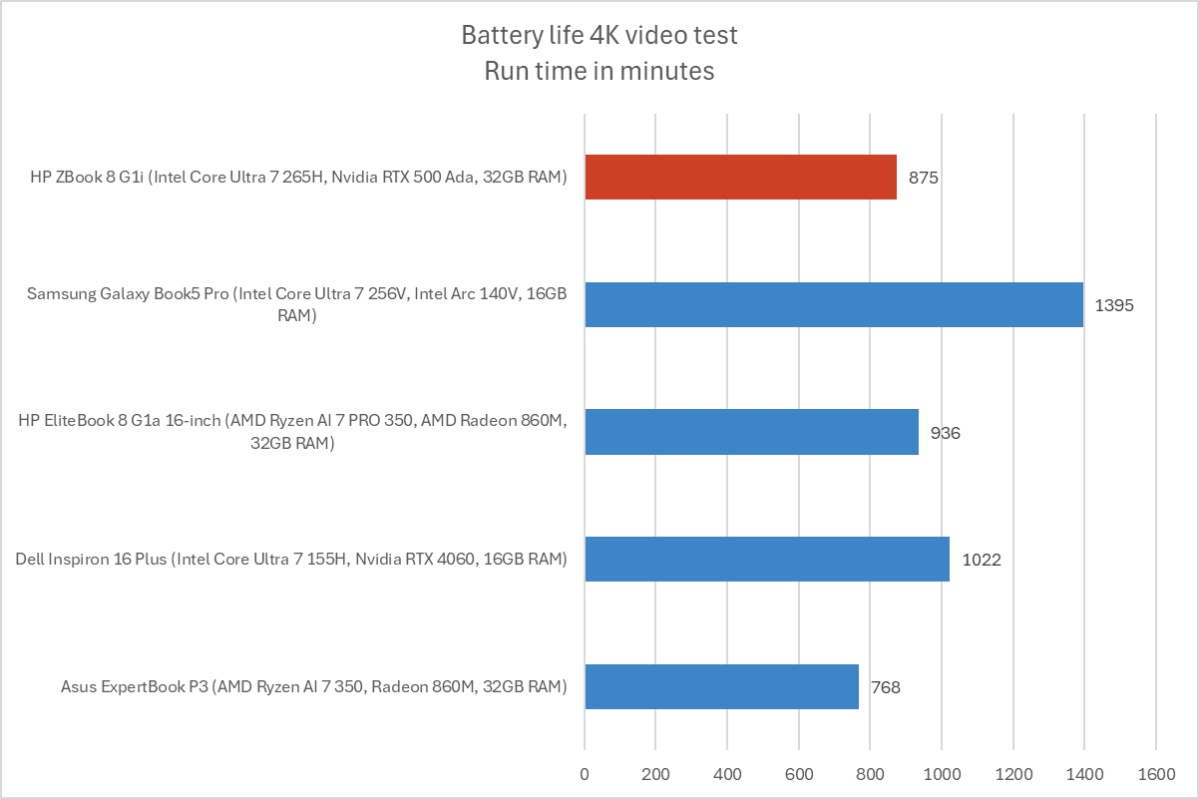
The HP ZBook 8 G1i has a sizable 77 Watt-hour battery. Intel’s Arrow Lake CPUs are more focused on performance than battery life, but the power-efficient display and sizable battery deliver solid battery life for a workstation.
Foundry / Chris Hoffman
To benchmark the battery life, we play a 4K copy of Tears of Steel on repeat on Windows 11 with airplane mode enabled until the laptop suspends itself. We set the screen to 250 nits of brightness for our battery benchmarks. This is a best-case scenario for any laptop since local video playback is so efficient, and real battery life in day-to-day use is always going to be less than this.
The HP ZBook lasted for about 14 and a half hours before suspending itself. It should get you through a full workday away from an outlet, if you like. But you’ll need to plug the laptop in to get the best performance from the hardware, anyway. What you end up with is a laptop that can last away from an outlet when it needs to. The battery life is solid for this hardware.
HP ZBook 8 G1i: Conclusion
The HP ZBook 8 G1i knows exactly what it is: A portable workstation for professionals complete with high-end CPU performance, a long warranty, workstation-class Nvidia graphics, a generous amount of RAM, and a big SSD.
And HP knows exactly how to price it: While $5,755 seemed extreme, the fact that the machine was already 61 percent off when I finished reviewing it shows how ready HP will be to cut the price to something reasonable.
If you’re looking for a fast professional workstation, the HP ZBook 8 G1i fits the bill. Just don’t pay $5,755 for it.
What's Your Reaction?
 Like
0
Like
0
 Dislike
0
Dislike
0
 Love
0
Love
0
 Funny
0
Funny
0
 Angry
0
Angry
0
 Sad
0
Sad
0
 Wow
0
Wow
0