





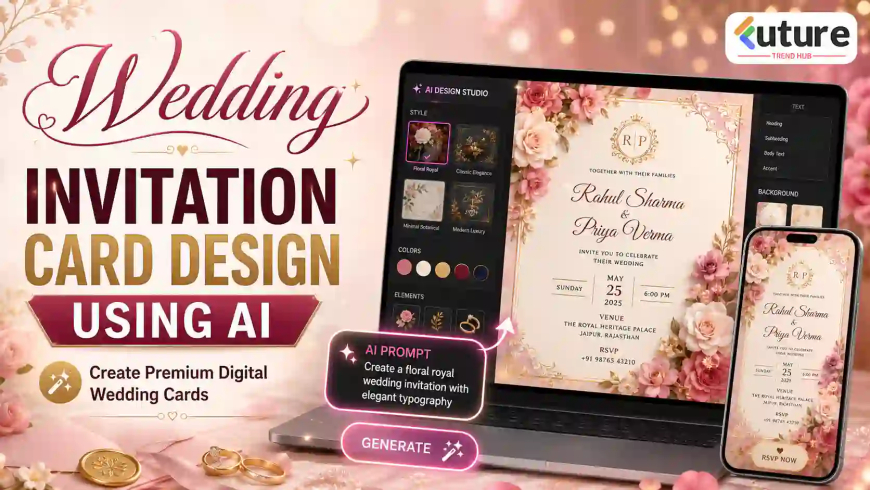
Wedding Invitation Card Design Using AI: Create Premium Digital Wedding Cards in 2026
Create wedding invitation card design using AI with ready prompts, themes, colors, fonts, layout tips, and WhatsApp card ideas.
Wedding Invitation Card Design Using AI: Create Premium Digital Wedding Cards in 2026
Introduction
Wedding planning is beautiful, emotional, and exciting, but it can also become overwhelming very quickly. From venue booking to outfit selection, guest list, catering, decoration, photography, and family coordination, everything needs attention. In between all this, designing a wedding invitation card often becomes a time-consuming task.
Many people want a beautiful wedding card, but not everyone has design skills, expensive software, or enough budget to hire a professional designer for every small change. This is where wedding invitation card design using AI becomes genuinely useful.
With the right prompt and a clear idea, beginners can create elegant, modern, traditional, floral, royal, or premium wedding invitation cards in minutes. The card can be used for WhatsApp, Instagram, Facebook, email, and even printing.
The best part is that you can create something personal. Aap apne naam, family details, theme, colors, wedding vibe, and cultural elements add karke card ko truly special bana sakte ho.
Important Details to Include in a Wedding Invitation Card
A wedding card should look beautiful, but it must also be complete and easy to understand. Many beginners focus too much on decoration and forget important details like time, venue, RSVP, or event sequence.
For a wedding invitation card, include these details clearly:
- Bride’s name
- Groom’s name
- Host/family name
- Wedding date
- Wedding time
- Venue name and full address
- RSVP/contact number
- Wedding ceremony name
- Reception details, if separate
- Dress code, if required
- Theme, if any
- Blessing line or short invitation message
- Map/location note, if needed
- Hashtag, if used for social media
- Separate event details for haldi, mehendi, sangeet, reception, or engagement
Simple Wedding Invitation Text Example
Together with their families
Aarav Sharma & Meera Verma
request the pleasure of your presence
as they begin their new journey together.
Wedding Ceremony
Saturday, 25 May 2026
7:00 PM Onwards
The Grand Celebration Hall, New Delhi
Reception to follow
RSVP: 98765 43210
From my experience, the best wedding cards are not always the most heavily decorated ones. The best cards are the ones where names, date, and venue are clearly readable even on a mobile screen.
Step-by-Step Process to Create Wedding Invitation Card Using AI
Creating a wedding invitation card using AI is simple when you follow a proper process. Agar aap beginner ho, do not start directly with random design generation. First prepare your details and theme.
1. Decide the Card Purpose
First decide where the card will be used.
2. Select Theme and Size
Choose a theme based on the wedding mood.
For example:
- Royal theme for a grand wedding
- Floral theme for a romantic wedding
- Traditional ethnic theme for family invitation
- Minimal modern theme for elegant couples
- Pastel theme for soft and premium look
- Destination wedding theme for beach or palace wedding
Before generating the design, collect all event details in one place.
Write:
- Bride and groom names
- Parents/family names
- Wedding date
- Time
- Venue
- Reception details
- RSVP
- Dress code
- Blessing line
- Ceremony names
This saves time and reduces mistakes.
3. Use our Ready-to-use Prompts
3–4 Ready-to-Use AI Prompts for Wedding Invitation Card Design
Here are ready-to-use prompts you can copy and customize.
Prompt 1: Modern Digital Wedding Invitation Card
“Create a modern and elegant wedding invitation card for a wedding ceremony. Use a clean premium layout with ivory, blush pink, champagne gold, and soft beige colors. Add clear space for bride name, groom name, wedding date, time, venue, RSVP, and a short blessing line. Use stylish readable fonts, soft floral background elements, subtle gold accents, and a balanced composition suitable for WhatsApp sharing and social media. Keep the design professional, romantic, attractive, and uncluttered.”
Prompt 2: Traditional Indian Wedding Invitation Card
“Create a traditional Indian wedding invitation card with cultural design elements, elegant borders, warm colors, and a festive background. Use maroon, gold, cream, and deep red color palette. Add traditional motifs like mandala patterns, paisley borders, lotus elements, diya glow, and subtle ornamental details. Keep the text area clear for bride name, groom name, family name, date, time, venue, and RSVP. The card should look graceful, respectful, premium, and suitable for family sharing on WhatsApp.”
Prompt 3: Premium Luxury Wedding Invitation Card
“Design a premium luxury wedding invitation card with a royal and elegant look. Use gold accents, deep emerald green, black, ivory, and champagne tones. Add soft lighting, premium serif typography, elegant floral ornaments, classy background texture, and a luxury frame. Add enough space for event name, bride and groom names, host name, date, time, venue, dress code, and RSVP. Make it suitable for high-quality digital sharing and printing. The design should look expensive, clean, polished, and professional.”
Prompt 4: Floral Royal Wedding Invitation Card
“Create a floral royal wedding invitation card with a romantic and elegant theme. Use pastel pink, white, sage green, and gold color palette. Add watercolor flowers, luxury gold border, soft glowing background, delicate leaves, and premium script typography for bride and groom names. Keep the center area clean for wedding date, time, venue, RSVP, and blessing message. Make the card suitable for WhatsApp sharing, Instagram story, and print. The final design should look premium, emotional, and beautiful.”
Best Design Themes for Wedding Invitation Card Design Using AI
The theme decides the personality of your wedding card. A good theme should match the couple, family style, venue, and event mood.
1. Minimal Modern Theme
This theme is clean, elegant, and timeless. It uses simple fonts, soft colors, and lots of white space.
Best for:
- Court marriage invitation
- Simple wedding ceremony
- Modern couple invitation
- Intimate wedding dinner
Colors:
- White
- Beige
- Champagne
- Soft gold
- Light grey
2. Premium Luxury Theme
This is perfect for grand weddings and hotel receptions. It gives a high-end look with metallic accents and rich colors.
Best for:
- Reception party
- Banquet wedding
- Luxury hotel wedding
- Formal evening celebration
Colors:
- Black and gold
- Emerald and gold
- Navy and champagne
- Maroon and ivory
3. Traditional Ethnic Theme
This theme is ideal for Indian, South Asian, and culturally rich weddings. It may include mandala, lotus, paisley, kalash, diya, or temple-style patterns.
Best for:
- Hindu wedding
- Traditional family invitation
- Cultural wedding ceremony
- Religious wedding function
Colors:
- Red
- Maroon
- Gold
- Orange
- Cream
4. Floral Wedding Theme
Floral wedding invitation cards are romantic, soft, and elegant. They work well for both modern and traditional weddings.
Best for:
- Engagement
- Wedding ceremony
- Reception
- Garden wedding
- Day wedding
Flowers to use:
- Rose
- Jasmine
- Peony
- Lotus
- Cherry blossom
- Lavender
5. Royal Palace Theme
A royal wedding invitation card uses palace backgrounds, golden frames, chandeliers, arches, and regal typography.
Best for:
- Destination wedding
- Palace wedding
- Grand reception
- Luxury family celebration
Colors:
- Royal blue and gold
- Burgundy and gold
- Black and gold
- Ivory and antique gold
6. Pastel Wedding Theme
Pastel wedding cards look soft, modern, and premium. They are very popular for digital wedding invitations.
Best for:
- Day wedding
- Engagement
- Reception brunch
- Outdoor wedding
- Young couple invitation
Colors:
- Blush pink
- Peach
- Lavender
- Mint
- Baby blue
- Cream
7. Destination Wedding Theme
This theme is useful when the wedding is happening at a special location like a beach, palace, resort, hill station, or heritage property.
Best for:
- Beach wedding
- Palace wedding
- Resort wedding
- Travel-based wedding
Design elements:
- Beach waves
- Palm leaves
- Palace arches
- Mountains
- Travel icons
- Map elements
8. WhatsApp Digital Wedding Invite Theme
This theme is mobile-first. It uses larger text, vertical layout, clean structure, and fewer decorative elements.
Best for:
- Quick family sharing
- WhatsApp groups
- Relatives and friends
- Social media sharing
This is one of the most practical formats today because most people open wedding cards on mobile.
Best Colors, Fonts, and Layout Tips
Wedding card design depends heavily on colors, fonts, and spacing. A beautiful theme can fail if the font is unreadable or the color contrast is poor.
Best Color Combinations
Use color combinations according to the mood:
- Red + Gold + Cream for traditional Indian wedding
- Maroon + Antique Gold for royal wedding
- Ivory + Blush Pink + Champagne for modern wedding
- Emerald Green + Gold for luxury wedding
- Navy Blue + White + Gold for formal reception
- Peach + Mint + White for pastel wedding
- Black + Gold for premium evening event
- White + Sage Green for minimal wedding
Do not use too many colors. For most wedding cards, 2–3 main colors are enough.
Font Pairing Tips
Use font pairing carefully.
Good font combination:
- Script font for bride and groom names
- Serif font for heading and invitation message
- Simple sans-serif font for date, time, venue, and RSVP
Avoid:
- Too many fonts
- Very thin fonts
- Over-decorative fonts
- Fonts that are difficult to read on mobile
For wedding cards, the couple’s names can be stylish, but event details should always be clear.
Background Suggestions
Good background ideas:
- Soft floral texture
- Luxury paper texture
- Subtle gold shimmer
- Mandala pattern
- Palace arch
- Watercolor wash
- Marble texture
- Minimal cream background
Avoid backgrounds that are too busy behind the text.
Spacing and Readability
Give breathing space between sections. Do not place all details in one block.
Good layout flow:
- Opening invitation line
- Bride and groom names
- Wedding ceremony title
- Date and time
- Venue
- RSVP
- Blessing line or family name
Mobile-Friendly Design
Most wedding cards are shared on phones. Use bigger fonts and portrait size.
Best size for WhatsApp:
- 1080 x 1920 px
For Instagram story:
- 1080 x 1920 px
For square social media post:
- 1080 x 1080 px
For print:
- 5 x 7 inches
- A5
- A4 for detailed program cards
Print-Friendly Layout
For printing, keep:
- High resolution
- Proper margin
- No text too close to border
- Clear contrast
- PDF export
- Good quality background
Before printing in bulk, print one sample first.
Common Mistakes to Avoid in Wedding Invitation Card Design
Even a premium design can look weak if basic mistakes are ignored.
1. Too Much Text
2. Poor Font Selection
3. Low Contrast
4. Wrong Spelling of Names
5. Missing Date, Time, or Venue
6. Overcrowded Layout
7. Using Too Many Colors
8. Not Checking Mobile Readability
9. Forgetting RSVP Details
10. Not Matching Design With Event Mood
A royal wedding card should not look like a casual party flyer. A minimal wedding card should not be overloaded with heavy traditional graphics.
FAQs About Wedding Invitation Card Design Using AI
1. How can I create a wedding invitation card using AI?
You can create a wedding invitation card using AI by writing a clear prompt with wedding theme, colors, bride and groom names, date, time, venue, RSVP, and design style. After generating the design, edit the text and export it for WhatsApp, social media, or print.
2. Which AI tool is best for wedding invitation card design?
Template-based design tools with AI features are usually easiest for beginners. Choose a tool that allows text editing, image upload, size selection, background customization, and high-resolution export.
3. Can I create a WhatsApp wedding invitation card using AI?
Yes, you can create a WhatsApp wedding invitation card using AI. Use a vertical size like 1080 x 1920 px, keep text large, and avoid too many small decorative details.
4. What details should be included in a wedding invitation card?
A wedding invitation card should include bride and groom names, host or family name, wedding date, time, venue, RSVP contact, ceremony details, dress code if needed, and a short invitation or blessing line.
5. Can beginners create wedding invitation cards using AI?
Yes, beginners can create wedding invitation cards using AI. You only need to give clear design instructions and then customize the final output with correct event details.
6. How do I make my AI wedding invitation card look professional?
Use readable fonts, 2–3 matching colors, clean spacing, proper contrast, elegant borders, and a theme that matches the wedding mood. Keep the design balanced and avoid overcrowding.
7. Can I print AI-generated wedding invitation cards?
Yes, you can print AI-generated wedding cards. Export the final design in high resolution, preferably PDF or PNG. Use print-friendly sizes like 5 x 7 inches or A5.
8. What size is best for digital wedding invitation cards?
For WhatsApp and Instagram stories, 1080 x 1920 px is a good size. For social media posts, 1080 x 1080 px works well. For printing, 5 x 7 inches or A5 is commonly used.
What's Your Reaction?
 Like
0
Like
0
 Dislike
0
Dislike
0
 Love
0
Love
0
 Funny
0
Funny
0
 Angry
0
Angry
0
 Sad
0
Sad
0
 Wow
0
Wow
0